Category: hacks news

  • More hackers now on the ‘new blogger’ hacking scene

    Hello Readers,

    Life has been very busy for me in the last couple of weeks and therefore I have not been posting any new hacks or code. However, the the hacking scene has not gone cold. Lots of stuff has been happening in the blogger hacking space.

    1. You might have looked at Ramani’s lightining fast Neo template. If not check it out here.

    2. Classic Blogger’s favorite hacker, Aditya of last word has moved to the new blogger and is now making hack for the new platform. Check out his page here (looks great!).

    3. Deepak of Blogger Hacked is spinning out quality Ajax based hacks also displaying strong coding skills. I highly recommend checking out his hacks.

    That’s what I have noticed recently. Hope this keeps you busy for sometime! Happy hacking and a very happy 2007.

  • Tamed rounders template now hacked and downloadable

    Hello all,

    Deniz of imessengr has taken the three column rounders template and hacked it to include most of the popular hacks currently available for the new Blogger. He has done this for all the variants of rounders that are available on Blogger.

    Visit here to download this template and install it in your blog.

  • Hack Round-up

    Hello Readers,

    Well, I had no new ideas (except for a few which require CSS knowledge) so I have no new hacks of my own as of now. However, this post points to some good hacks/add-ons/template mods that I have seen in the neighborhood recently:

    1. Hacked Son of Moto template by Deniz of imessengr.
    2. Adsense beside your posts in blogger beta by Deniz of imessengr.
    3. Adsense between the posts (adding adsense directly to the beta template) by Loui$$ of Blogging No Secret.
    4. Template theme switcher (and tutorial to host Blogger Beta CSS externally) and hacked Blogger templates with this functionality (inbuilt) by PurpleMoggy.

    In addition, I have found my interaction with Deniz and posts from “Blogging Secret” very informative with reference to Adsense related tips (especially for Blogger Beta).

    BTW this post is done directly from a nice but nifty Firefox extension called Performancing. I really like their idea/design and concept, especially because I am yet to see my first post from Google Docs appear on my test blog.

  • JSON, customizable widgets and other applications

    Hello Readers,

    There is some really good stuff happening in the Blogger hacking world. This comes after the recent announcement on Blogger buzz regarding Blogger (or I can say all of Google) moving to JSON (JavaScript Object Notification) data format for feeds.

    The hacks I am referring to are:

    1. Hoctro’s Recent Comments/Posts widget.
    2. Ramani’s Customizable Recent Comments Widget.
    3. Hans’s Customizable Recent Comments Widget with date and post title (offered in one-click widget install feature).

    And this is not it, Stephen from Singpolyma-tech has announced an upgrade for his popular hack – Peek-a-boo comments on main page. All this is really good stuff!

    Technorati Tags: ,

  • Cool Technorati Add-ons for your Blog

    Hello Readers,

    I have come across two cool add-ons for your blog. They are:

    1. Technorati Rank display widget by purplemoggy
    2. Technorati Blog reactions link from imessengr.com

    1. PurpleMoggy has posted a very useful add-on with which one can display their real-time Technorati rank in the blog’s sidebar. To get a preview of the add-on and learn the code click here.

    2. Deniz from imessengr.com has provided the Blogger Beta code for displaying the number of links from other blogs to a particular post via Technorati’s engine. To get a preview of this add-on and learn the code click here.

  • New hacked template for Blogger beta and return of "flag-blog"

    Dears readers,

    The topics covered in this post are:

    1. A hacked sand-dollar template (with widebar) for blogger beta by imessengr.com
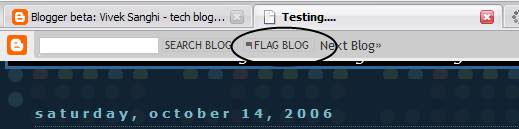
    2. “Flag blog” option now available for Blogger beta blogs.

    1. Hacked Sand Dollar Template

    Deniz from imessengr.com (the one who presented the recent referrers hack for blogger beta) has released a hacked sand dollar template for blogger beta. This template contains a variety of hacks and is based on the widebar design I had discussed earlier in my posts. You can preview this template from here and view this post to learn more and download the template.

    2. “Flag Blog” option now available for Blogger beta blogs.


    I just noticed that the “flag blog” or “flag this” button on the navbar which was available only for the classic Blogger blogs in now available for Blogger Beta blogs as well. With this, blogger has brought yet another feature of Blogger v2.0 into beta i.e. v3.0.

  • A Firefox extension and PurpleMoggy’s hacks

    Hello readers,

    I have been using a Firefox extension by name fasterfox. If slow browsing speed has been a problem for you, I recommend that you give it a shot.

    Coming to beta hack, this blog now uses two hacks which I picked up from PurpleMoggy’s blog. It appears that a tutorial has been put up for the search box. Please find the tutorial on implementing a 4-in-1 search box (like I have) here.

    The second hack I found in PurpleMoggy is a javascript based peek-a-boo system for linklists in sidebar. This is almost same as Blogger University’s expand-collapse menu. Just that the hack I am using was picked-up by PurpleMoggy from here and modified using CSS such that it blended very well with my template as well.

  • Blogger template anatomy (non-beta bloggers)

    Hello readers,

    I was browsing through instabloke and in it I came across a link which contains a very good explanation of a non beta blogger template. If one wishes to learn blog hacking, one must know thy template well. I recommend you go through this article to learn more.

    The writer(s) have actually use a picture of a sample blog and provided each section of the blog with its relevant CSS and HTML code. In addition, I also like their blog’s design and certain page elements. Good work done by the author(s)!

  • Hack updates

    Hello all,

    Here is your round of hack updates which covers recently introduced new hacks for blogger beta.

    1. Expandable/collapsible post with Peek-a-boo style (updated to Super peek-a-boo)

    Ramani has come out with another hack where in users can provide their reader with a summary view of their post and a peek-a-boo style link to view the rest of the post. This is a very good hack for people like me who use one blog for publishing hacks, writing musings, diary notes, book reviews etc. And it also allows one to display more number of posts on the main page with out making the posts section super long.

    Update (Sep 22):Ramani and Hans of beutiful beta have jointly developed a modified version of this hack (super peek-a-boo) which allows one to have expand/collapse post feature and skip offering this functionality where they don’t want it. You can down the hack from hackosphere or beautiful beta. A non-beta implementation is also available on their blogs.

    2. Hoctro’s hacks

    Talking of flexibility, Hoctro has been doing wonders. He has brought out a series of hacks on blog navigation and template design. I highly recommend you check out his recent hacks like:

    a. Creating a Table of Contents
    b. Yahoo-ui-libraries for blogger beta
    c. Adding breadcrumbs navigation

    3. Bloggeratto’s updates

    For more hack updates please visit Avatar’s bloggeratto. Also, Avatar plans to announce a hack on how to auto-hide the navbar in blogger beta. So stay tuned to bloggeratto.

  • Linklists don’t open in a new window and new hacks

    Just a quick update. I found that links added via the link list feature do not open in a new window. This might take away traffic from your blog. The solution to this is however, very simple. Open up you template’s HTML code in expanded widgets format. Copy the entire code into notepad or some text editor and search for a particular link list using its title. (In my case the title is “friends on www”)

    Scroll to the line which reads a expr:href=”data:link.target’ blah blah blah… and append target=’_blank’ over there, as shown in the example below. As this piece of code is in a loop (b:loop) you need to type it only once and there you are. So go ahead and make the modification.

    <b:widget id=’LinkList2′ locked=’false’ title=’friends on www’ type=’LinkList’>
    <b:includable id=’main’>

    <b:if cond=’data:title’><h2><data:title/></h2></b:if>
    <div class=’widget-content’>
    <ul>
    <div id=’link’>
    <b:loop values=’data:links’ var=’link’>
    <li><a expr:href=’data:link.target’ target=’_blank’><data:link.name/></a>
    </li>
    </b:loop>
    </div>
    </ul>

    Also check out some cool new hacks I came across recently:

    1. Turning labels into menu tabs (used in my blog)
    2. Peek-a-boo label drop downs (used in my blog)
    3. Convert link lists to thumbnail picture list

    Update: I found an article which tell why one should avoid setting all links to open in a new window. It tells how this setting can backfire and kill traffic. Read it here.