The law I cannot read
I have legal interests in Thailand, and I cannot read Thai.
That is an awkward position for a lawyer. Thailand’s statutes are published in Thai, and the Thai text is the law. Anything in English is somebody’s reading of it. For the Codes that govern property, family and succession, the Thai government’s own legal drafting office holds no English text at all. I checked, and how I checked is part of this post.
So I built a second law library on my own computer. The first one, of Indian statutes and judgments, is a separate project. This one holds Thai law in Thai, with every line of English labelled by how far it can be trusted, and it answers a search in a fraction of a second.
I built it with Claude, Anthropic’s AI model, working as an agent: it could run programs on my computer and use my Chrome browser, under rules I set. I made the decisions. The scripts and most of the investigation came from the model, and so did a good number of the mistakes. The work started on 4 September 2026; most of it ran in the last week of September.
One thing to say before anything else: I am an Indian advocate, not a Thai lawyer. This is a post about building a research tool, not advice on Thai law. There is a fuller note at the end.
Every English word gets a label
The first decision was a rule about English.
Thailand is a civil law country. Thai courts are not formally bound by earlier decisions, the Supreme Court’s included, though those decisions carry weight. The statute book matters more than case law, and the statute book is Thai. If I am going to rely on any of this, every English sentence has to say where it came from.
So there are four tiers:
T1  Thai official text, or English the agency published as part of the instrument
T2  English published by a Thai agency, marked unofficial
T3  third-party English: commercial translations, law firm sites
T4  machine output, ours: for finding and reading only, never quoted, never cited
Every text file carries a tier: line in its header, and the search tool prints the tier beside every result. Machine English comes out as T4 machine translation - NEVER quote or cite, in capitals, every time. That label is what stops a fluent sentence from turning into a citation.
Finding the statute book
The Office of the Council of State publishes the official consolidated text of Thai laws. Its old address, krisdika.go.th, no longer served it; the office had moved to ocs.go.th.
The new site’s search page is backed by a form-encoded endpoint, POST /searchlaw/indexs/list_table_search. Two things stood between it and a clean list.
The first was TLS. The server does not send its intermediate certificate. A browser fetches the missing certificate itself; Python’s requests does not, and fails. Setting verify=False would have silenced the error by switching the check off. The fix used instead was truststore, which hands verification to Windows’ own certificate chain building, and Windows can find the missing intermediate. The check still happens.
The second was a filter. The site’s own search page sends the parameter query[lawCategoryName] with the value 1B,1C. Sent that way, the index hid 7 of 147 records. Sent empty, all 147 came back. I would not have known without counting both ways.
That gave titles and PDFs, not text. The text sits behind a viewer, an Angular single-page app, and five guessed endpoints returned 404. What worked was opening the viewer in a browser and reading how the page itself asks the server for a law, from its network traffic and its JavaScript bundle. The viewer uses a public JSON endpoint:
POST https://searchlaw.ocs.go.th/ocs-api/public/doc/getLawDoc
Content-Type: application/json

{ "reqHeader": { ...request id, channel, timestamp, service name... },
  "reqBody":   { "timelineId": "<id from the index>", "isTransEng": false,
                 "sectionIds": [], "sectionAndExplains": [] } }
What comes back is structured: each section with its number, label and HTML content, plus every version of that law. For the Civil and Commercial Code that was 2,254 entries and 605,706 characters, in force from 25 March 2025. File downloads on the same site go through a route that needs a token the viewer holds. The token was never read or reused: the English PDFs mentioned below were saved through the viewer’s own download button, as any reader would save them.
The English that was not there
The same request has a flag, isTransEng. Set to true, it asks for English.
For all eight Thai Codes, the answer was SUCCESS with zero sections. The system knows the English names of the Codes. It holds none of their English text.
There was one exception. The Civil and Commercial Code’s timeline has 73 versions, and one of them, the original 1925 text, is marked as having a translation: a 242 KB file. For a week the working assumption was that this was an English translation of the 1925 Code. When the file came down and was read, its title page said otherwise. It is the Act Amending the Civil and Commercial Code (No. 20), B.E. 2557 (2014): one amending Act, filed against the original version.
The note was corrected with the date of the correction, and the earlier reading left on record. A timeline entry tells you a file exists. Only the file tells you what it is.
The Council of State does hold English for other laws, and 70 such PDFs, covering 57 laws, are now in the library. They are T2, and they say on their face that the Thai is the sole authority. Many turned out to be amending Acts rather than the main Act, which is one more reason the library reads the Thai consolidation first.
A section 2 that appeared 36 times
With the endpoint working, the eight Codes came down as structured text: 5,526 entries, of which 4,453 are numbered provisions. Then the counting started, and the counting is where the bugs were.
Section 2 appeared 36 times in the Civil and Commercial Code file. Each Code’s file carries the Acts that amended it, appended at the end, and each of those Acts numbers its own sections from 1. Left as it was, a search for section 2 would find 36 candidates and one of them would be right. Every entry now carries a flag saying whether it belongs to the Code itself. That is how the 2,254 entries in the Civil and Commercial Code file come down to its 1,850 provisions; the rest are headings and the appended Acts.
Some of the others:
- The Land Code has eight entries in a row all labelled section 105. They are 105, 105 bis, ter and on to octies. The label field cuts the number short, so the real reference is parsed from the text.
- The same ordinal is spelled two ways:
อัฎฐwith ฎ in the Civil Procedure Code,อัฏฐwith ฏ in the Land Code. - The site served escaped HTML comments,
<!--[endif]-->, which only became comments after unescaping, so the comment-stripper never saw them. The selftest had passed because its fixture used a real comment: it was written from the fix, not from the data.
Once all of these were fixed, no reference in any of the eight Codes appeared twice.
When a repealed law is still current
Each version in a law’s timeline carries a stateId. 01 looked like “in force” and 00 like “superseded”.
Of the 652 index rows whose titles carry the repeal marker (ยกเลิก), 638 sit at 01. The last version of a repealed law is still that law’s current version. So repeal is read from the title marker, never from the state.
A probe on 24 September found a third state, 02: published but not yet in force, with a fifth version type, a future consolidation showing the law as it will read once a pending amendment starts. On 30 September that turned up a trap. A value-added tax decree showed a future consolidation in force from 1 October 2026, and it left out a separate amending decree of the same date that keeps the reduced rate for another year. Read alone, the future text would have given the wrong rate. The library now holds the amending decree separately and flags any future version that matches the current one.
That same day the whole library was checked against the Council of State: 837 timeline entries under the parent laws held, and all 773 laws unchanged since they were fetched. The consolidations themselves can trail behind amendments. The Revenue Code’s latest consolidation on the site is dated 9 November 2021. The site cannot show an amendment it has not yet worked in, so the issuing department is the cross-check.
Working with an agent that can be wrong
An agent that can run programs on my computer and drive my browser can do a great deal in an afternoon. It can also be wrong about a file it has not looked at, and it writes fluent explanations of things that did not happen. The rules I work under came out of incidents.
The separation rule came first. The Thai library sits beside the Indian one on the same disk, and early on a Thai backup was written into the Indian backup folder. Nothing was lost, but since then a guard refuses any path under the Indian backups, and a checker audits every script for where it can reach. Building that checker produced two of the stranger moments of the month:
io.open(path, "w", newline=...)empties the file before it raises on a badnewlineargument. The checker truncated itself to zero bytes that way. Everything now writes to a temporary file andos.replaces it.- A Windows path such as
D:\...\Thai_Backupis, to a Linux program, an ordinary file name. Run from the agent’s side, a backup created a folder whose name was the whole Windows path, inside the library. It looked like a successful backup.
The second rule is that every claim has to be shown. If the agent says a backup exists, it shows the listing. If it asks me to run a file, it first opens that file and quotes the line that does the work. That rule came after a session with five errors of this kind, one of which was a recommendation to run a batch file that would have thrown away three days of work.
The third is a backup before anything that rewrites a file. Once, a batch file suggested in passing rewrote a file another script had written its OCR results into, and hours of machine time went with it. Now a copy comes first, and both checksums are shown. On 1 October that rule ran on something small: one translation cache file carried 1,443 NUL bytes left over from an interrupted run on 29 September. Nothing was lost, since the work had been redone, but the copy was taken, the bad line removed and all 776 cache files scanned before the index was rebuilt.
The agent works within limits I set. It uses the sites’ public pages and endpoints only, respects robots.txt, does not solve CAPTCHAs, enter passwords or handle login tokens, and anything I have to do myself comes as numbered steps from the first click. When it saves a file from a page, the page builds the file and a click on a link saves it to my Downloads folder.
PDFs that show one thing and say another
Not everything comes through the endpoint. Ministerial regulations, schedules and forms come as PDFs, and a PDF can look perfect on screen while its text layer says something else. The page is drawn from the glyph outlines in the embedded font; text extraction goes through a separate mapping from character codes to Unicode (the ToUnicode map, or the font’s encoding and glyph names when there is no map). If that mapping is wrong, the screen is right and the text is junk.
Three faults turned up.
Broken glyph maps. The outlines were intact; only the map was broken. So every glyph outline was hashed, hash-to-character was learned from pages whose maps are sound, and the junk glyphs were looked up by shape. On the first 29 junk pages that gave 27,277 glyphs and 88 distinct shapes, all decoded. One bug worth remembering: the font cache was keyed by PDF object id, and object ids repeat across files.
Mac Thai. Seven files decoded at 0% through the glyph table. All used one font pair, and the glyph names inside were Mac Roman names standing at the positions of Apple’s old Mac OS Thai encoding. The text was Thai written in Mac Thai and read back as Mac Roman. The repair is a table:
# simplified; Python has no mac_thai codec
MAC_EXTRA = {0x83: "\u0E48", 0x88: "\u0E48", 0x89: "\u0E49", 0x8C: "\u0E4C",
             0x92: "\u0E31", 0x93: "\u0E47", 0x94: "\u0E34", 0x95: "\u0E35",
             0x97: "\u0E37", 0x8D: "\u201C", 0x8E: "\u201D"}

def macthai_decode(s):
    out = []
    for ch in s:
        try:
            b = ch.encode("mac_roman")[0]
        except UnicodeEncodeError:
            out.append("\uFFFD"); continue
        if b < 0x80:
            out.append(ch)
        elif 0xA1 <= b <= 0xFB:            # Thai letters as in TIS-620; Apple's dashes and
                                           # symbols in this range differ and come out unknown
            out.append(bytes([b]).decode("cp874", errors="replace"))
        elif b in MAC_EXTRA:               # Apple's extra bytes, read from the pages
            out.append(MAC_EXTRA[b])
        else:
            out.append("\uFFFD")           # counted as unknown, never guessed
    return "".join(out)
The first trial dropped every ส. Mac Roman 0xCA is a no-break space; in Mac Thai, 0xCA is ส, and the first trial read it as a space. A wrong decode can also come out looking like Thai, so a decoded page is accepted only if Thai spelling holds: a vowel or tone mark must follow a consonant, the leading vowels must precede one, and the violation rate must be under 1%.
Sara aa written as sara am. Ten PDFs, 30 pages, wrote every า as ำ, and every real ำ with a space in front of it: กำร for การ, ก ำหนด for กำหนด. The page test called them Thai, because they are Thai letters. The repair is exact:
# simplified
import re
MARK = "\uE000"
def fix_sara_aa(t):
    t = re.sub(r" ([\u0E48-\u0E4B]?)\u0E33", lambda m: m.group(1) + MARK, t)  # " ำ" is the real ำ
    return t.replace("\u0E33", "\u0E32").replace(MARK, "\u0E33")             # every other ำ is า
Detection is by impossible spellings, กำร, ตำม, จำก and a few more, appearing at least twice with none of the correct forms on the page. On the PDF folder it selected exactly those 30 pages. One of the ten files was the Land Code regulation on registration fees for transfers and mortgages.
Then a check against the official source became possible. Seventy-three regulations under the main Acts came back as official text through the endpoint, with the same identifiers as PDFs already read. The measure is the share of each PDF page’s Thai letters found, in order, in the official text:
method     pages   median
macthai      24    0.984
glyph        31    0.978
pua          38    0.978
layer       108    0.942
ocr         160    0.717
layer is a text layer taken as it is, pua a layer using the Unicode private-use area. Every page below 0.8 that was not one of the sara aa pages was a form or an annex: the official text holds the operative regulation only, and the PDF is the only source for forms and schedules. The 0.717 median for Tesseract on scanned Thai is why OCR text sits at T4. Thai numerals are the worst of it.
Machine English I will not quote
Accurate Thai I cannot read is of limited use to me. So every section has a machine English rendering, made locally by Google’s open Gemma model (gemma3:27b) through Ollama on an RTX 5090. The 26,978 sections were split into 27,198 pieces for translation, and the run log records about 36 hours of model time between the evening of 28 September and the afternoon of 30 September.
All of it is T4. The checks were there to make it good enough to search with and to read beside the Thai.
- Refusal at translation time: an answer is refused if it is empty, mostly Thai, far too short or far too long for the Thai it came from.
- Mechanical checks on every piece after every run: numbers in the Thai missing from the English; a section number that differs; a suffix section (
มาตรา ๓ ตรี) not rendered as “3 ter”; fewer numbered items than the Thai; runaway repetition; chatter such as “Here is the translation”. A failure goes back with the reason written into the retry prompt, at most twice; after that it is listed for reading. - A sample sheet of 30 random pieces, Thai beside English, at the end of every report.
- A termbase adherence table: for each fixed legal term, how often the English used the agreed rendering, and the Thai contexts the term turned up in.
The fourth caught the best mistake of the month. The termbase said อาศัย means “habitation”, as in a right of habitation. Only 24% of pieces followed it, and the commonest context was อาศัยอำนาจ, “by virtue of the power”. The word inside other words was being translated as habitation. Land Code section 96 bis came out as aliens obtaining land “through habitation based on a treaty”; the Thai says by virtue of a treaty. The entry was narrowed to สิทธิอาศัย, right of habitation, and the bad renderings fell from 202 to 6, each of the 6 a proper use.
Flagged pieces fell from 83 on the first pass to 7 on the last. Claude read those 7 against the Thai: six are real omissions of a number or a cross-reference and are listed as known defects, and one is a typo in the source. That is a machine checking a machine, which is the reason none of it is ever quoted.
One file, a fifth of a second
The Indian library runs on parquet files and DuckDB, because a million judgments need it. This one is a single SQLite file with two FTS5 indexes.
- Thai uses the
trigramtokenizer (SQLite 3.34 or later). Thai is written without spaces between words, and trigram matching needs no word-splitting. A query term shorter than three code points cannot use the trigram index, so it falls back toLIKE. Thai vowels and tone marks are separate code points, so ที่ is three of them. - English uses Porter stemming with prefix matching, a small synonym list (sale/sell, land/immovable, wife/spouse, foreigner/alien), and the termbase: an English phrase that matches a termbase rendering also searches the Thai term, at half weight.
SQLite could not write its database file on the folder as the agent’s environment mounts it; the first attempt failed with disk I/O error. So the index is built in memory and written out in one go:
# simplified; serialize() needs Python 3.11+
import os, sqlite3
mem = sqlite3.connect(":memory:")
mem.execute("CREATE VIRTUAL TABLE fts_th USING fts5(text_th, tokenize='trigram')")
# ... load sections, agency texts, notes ...
with open(tmp_path, "wb") as f:
    f.write(mem.serialize())
os.replace(tmp_path, index_path)   # the old index survives until the new one is complete
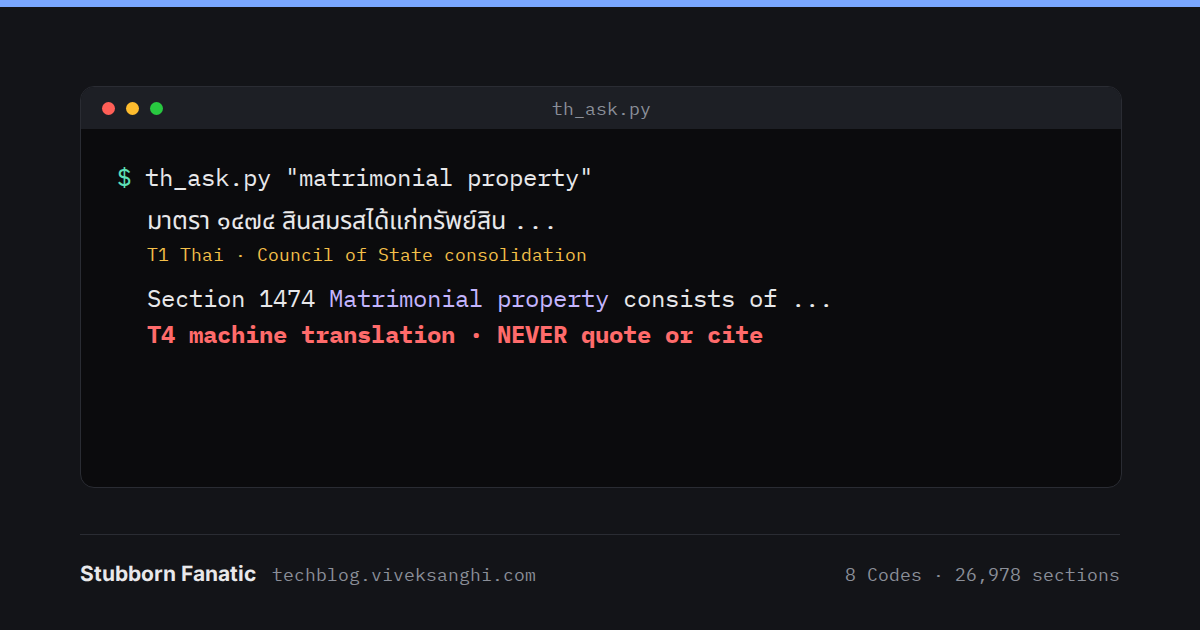
A search looks like this. The square brackets mark the words that matched:
python3 th_ask.py "matrimonial property"

Civil and Commercial Code, section 1474
  TH  [T1 Thai, Council of State consolidation, in force from 2025-03-25]
      มาตรา ๑๔๗๔ สินสมรสได้แก่ทรัพย์สิน (๑) ที่คู่สมรสได้มาระหว่างสมรส ...
  EN  [T4 machine translation - NEVER quote or cite]
      Section 1474 [Matrimonial] [property] consists of [property] (1) which
      the spouses obtained during marriage. ...
As of 1 October 2026: 26,978 sections, all with machine English; 1,218 third-party English pages; about 8,400 chunks of agency, tax, OCR, treaty and note text. The index is 146 MB, a full rebuild takes about 11 seconds, and a search returns in 0.1 to 0.2 seconds. I looked at moving it to the parquet-and-DuckDB layout of the Indian library and left it as it is. That layout exists for a 5.8 GB judgment index; an 11-second rebuild gains nothing from it.
Case law, later
Thai Supreme Court decisions are not in the library yet. That is a choice of order. In a civil law system a Supreme Court decision is not a precedent that binds; it carries persuasive weight and helps in reading the Code. The statute book had to come first. Case law is on the list for later, as a targeted set of decisions on property, family and succession rather than a bulk download.
What I check before relying on it
- The machine English. It is for finding and reading. Anything to be acted on needs an official English text where one exists, or a reading of the Thai by someone who reads it.
- The consolidations. They trail behind amendments; the issuing department is the cross-check.
- OCR text. It finds the page; then the page is read.
- Forms and schedules. They exist only in the PDFs, and some of those PDFs are still unread.
- The Bank of Thailand’s PDFs. 1,821 pages with junk text layers are measured and not solved. An improved glyph method can hash 98% of their glyphs, but more than half of those glyphs never appear on a clean page to learn from.
What this is for
I wanted to start any question of Thai law that touches my own affairs from the Thai text, with an honest label on every English word I lean on. The library does that now. A search gives me a Thai section, a T4 rendering to tell me what it says, and an official source to confirm it in.
A note on what this is not
I am an advocate enrolled in India. I am not a Thai lawyer, I do not practise Thai law, and as a foreign national I could not. Thai law allows only Thai nationals to register as lawyers (Lawyers Act B.E. 2528, section 35), and legal and litigation services are among the work Thai law reserves to Thai nationals, with narrow exceptions for arbitration. This library is a personal research tool for my own affairs. Nothing in this post is advice on Thai law. For any Thai-law matter, consult a lawyer licensed in Thailand.
The texts in the library are public: Thai legislation, regulations, official notices and judgments, and translations of them made by Thai state agencies, are outside copyright under the Thai Copyright Act (section 7). Third-party English is held for private research only and is not reproduced here.
Glossary
B.E.: Buddhist Era. Thai dates count from it; B.E. = C.E. + 543, so B.E. 2569 is 2026.
Council of State (ocs.go.th): the Thai government’s legal drafting office, which publishes consolidated texts of Thai laws.
Consolidation: the text of a law with its amendments worked in. A convenience; the law itself is what was published in the Royal Gazette.
Royal Gazette: the official gazette in which Thai laws are published and from which they take effect.
มาตรา: section. bis, ter, quater: inserted sections numbered after an existing one.
Termbase: a fixed list of Thai legal terms and their agreed English renderings, used to keep the machine translation consistent.
FTS5: SQLite’s full-text search extension. Trigram tokenizer: indexes every run of three characters, so text without word boundaries can be searched without splitting it into words.
ToUnicode map: the table inside a PDF that tells software which Unicode character each character code stands for. When it is wrong, a page looks right and extracts as nonsense.
Mac Thai: Apple’s old 8-bit encoding for Thai, close to TIS-620 for the letters, with extra bytes for tone marks and vowels.
OCR: optical character recognition. Tesseract is the open-source OCR engine used here.
กฎหมายที่ผมอ่านไม่ออก
ผมมีผลประโยชน์ทางกฎหมายอยู่ในประเทศไทย แต่ผมอ่านภาษาไทยไม่ออก
สำหรับคนเป็นนักกฎหมาย นี่เป็นสถานการณ์ที่ลำบากใจ กฎหมายไทยประกาศใช้เป็นภาษาไทย และตัวบทภาษาไทยคือตัวกฎหมาย ฉบับภาษาอังกฤษใด ๆ เป็นเพียงการอ่านของใครคนหนึ่ง สำหรับประมวลกฎหมายที่ว่าด้วยทรัพย์สิน ครอบครัว และมรดก หน่วยงานยกร่างกฎหมายของรัฐบาลไทยเองไม่มีตัวบทภาษาอังกฤษเลย ผมตรวจสอบแล้ว และวิธีที่ผมตรวจสอบก็เป็นส่วนหนึ่งของบทความนี้
ผมจึงสร้างห้องสมุดกฎหมายแห่งที่สองขึ้นในคอมพิวเตอร์ของตัวเอง แห่งแรกเป็นตัวบทและคำพิพากษาของอินเดีย ซึ่งเป็นอีกโครงการหนึ่ง แห่งนี้เก็บกฎหมายไทยเป็นภาษาไทย ภาษาอังกฤษทุกบรรทัดมีป้ายบอกว่าเชื่อถือได้แค่ไหน และค้นหาได้ในเสี้ยววินาที
ผมสร้างมันร่วมกับ Claude โมเดล AI ของ Anthropic ซึ่งทำงานในฐานะเอเจนต์ คือสั่งรันโปรแกรมบนคอมพิวเตอร์ของผมและใช้เบราว์เซอร์ Chrome ของผมได้ ภายใต้กฎที่ผมกำหนด การตัดสินใจเป็นของผม สคริปต์และการสืบค้นส่วนใหญ่มาจากโมเดล และความผิดพลาดจำนวนไม่น้อยก็เช่นกัน งานเริ่มเมื่อวันที่ 4 กันยายน 2026 และส่วนใหญ่ทำในสัปดาห์สุดท้ายของเดือนกันยายน
ขอกล่าวไว้ก่อนเรื่องอื่น ผมเป็นทนายความอินเดีย ไม่ใช่ทนายความไทย บทความนี้เล่าเรื่องการสร้างเครื่องมือค้นคว้า ไม่ใช่คำแนะนำเกี่ยวกับกฎหมายไทย รายละเอียดอยู่ในหมายเหตุท้ายบทความ
ภาษาอังกฤษทุกคำต้องมีป้าย
การตัดสินใจแรกคือกฎว่าด้วยภาษาอังกฤษ
ประเทศไทยใช้ระบบซีวิลลอว์ ศาลไทยไม่ผูกพันตามคำพิพากษาก่อนหน้าอย่างเป็นทางการ รวมถึงคำพิพากษาศาลฎีกา แม้คำพิพากษาเหล่านั้นจะมีน้ำหนักก็ตาม ตัวบทกฎหมายจึงสำคัญกว่าคำพิพากษา และตัวบทเป็นภาษาไทย ถ้าผมจะพึ่งพาสิ่งเหล่านี้ ประโยคภาษาอังกฤษทุกประโยคต้องบอกได้ว่ามาจากไหน
จึงแบ่งเป็นสี่ระดับ:
T1  ตัวบทภาษาไทยที่เป็นทางการ หรือภาษาอังกฤษที่หน่วยงานเผยแพร่เป็นส่วนหนึ่งของตัวกฎหมาย
T2  ภาษาอังกฤษที่หน่วยงานรัฐของไทยเผยแพร่ โดยระบุว่าไม่เป็นทางการ
T3  ภาษาอังกฤษจากบุคคลภายนอก เช่น คำแปลเชิงพาณิชย์ เว็บไซต์สำนักงานกฎหมาย
T4  ผลงานแปลด้วยเครื่องของเราเอง ใช้เพื่อค้นหาและอ่านเท่านั้น ห้ามยกอ้าง ห้ามอ้างอิง
ไฟล์ข้อความทุกไฟล์มีบรรทัด tier: ในส่วนหัว และเครื่องมือค้นหาพิมพ์ระดับไว้ข้างผลลัพธ์ทุกรายการ ภาษาอังกฤษที่แปลด้วยเครื่องจะขึ้นป้าย T4 machine translation - NEVER quote or cite เป็นตัวพิมพ์ใหญ่ทุกครั้ง ป้ายนี้คือสิ่งที่กันไม่ให้ประโยคที่อ่านลื่นไหลกลายเป็นข้อความที่ถูกนำไปอ้างอิง
ตามหาตัวบท
สำนักงานคณะกรรมการกฤษฎีกาเผยแพร่ตัวบทกฎหมายไทยฉบับปรับปรุงอย่างเป็นทางการ ที่อยู่เดิม krisdika.go.th ไม่ได้ให้บริการแล้ว หน่วยงานย้ายไปที่ ocs.go.th
หน้าค้นหาของเว็บไซต์ใหม่ทำงานบน endpoint แบบ form-encoded คือ POST /searchlaw/indexs/list_table_search มีสองเรื่องที่ขวางอยู่ก่อนจะได้รายการที่ครบถ้วน
เรื่องแรกคือ TLS เซิร์ฟเวอร์ไม่ส่งใบรับรองระดับกลาง (intermediate certificate) มาด้วย เบราว์เซอร์ไปดึงใบรับรองที่ขาดมาเองได้ แต่ไลบรารี requests ของ Python ทำไม่ได้และล้มเหลว การตั้ง verify=False จะทำให้ข้อผิดพลาดหายไปด้วยการปิดการตรวจสอบ วิธีที่ใช้แทนคือ truststore ซึ่งส่งงานตรวจสอบไปให้ระบบสร้างสายการรับรองของ Windows เอง และ Windows หาใบรับรองระดับกลางที่ขาดได้ การตรวจสอบจึงยังคงเกิดขึ้น
เรื่องที่สองคือตัวกรอง หน้าค้นหาของเว็บไซต์ส่งพารามิเตอร์ query[lawCategoryName] ด้วยค่า 1B,1C เมื่อส่งแบบนั้น ดัชนีซ่อนไป 7 รายการจาก 147 รายการ เมื่อส่งเป็นค่าว่าง ได้ครบทั้ง 147 รายการ ถ้าไม่นับทั้งสองแบบ ผมคงไม่รู้
ผลที่ได้คือชื่อกฎหมายและไฟล์ PDF แต่ยังไม่ใช่ตัวบท ตัวบทอยู่หลังหน้าแสดงผลซึ่งเป็นแอป Angular แบบหน้าเดียว และ endpoint ห้าแห่งที่ลองเดาได้ผล 404 ทั้งหมด สิ่งที่ได้ผลคือเปิดหน้าแสดงผลในเบราว์เซอร์ แล้วอ่านดูว่าหน้าเว็บขอตัวบทจากเซิร์ฟเวอร์อย่างไร จากการรับส่งข้อมูลบนเครือข่ายและจาก JavaScript bundle ของมัน หน้าแสดงผลใช้ endpoint JSON สาธารณะ:
POST https://searchlaw.ocs.go.th/ocs-api/public/doc/getLawDoc
Content-Type: application/json

{ "reqHeader": { ...request id, channel, timestamp, service name... },
  "reqBody":   { "timelineId": "<id from the index>", "isTransEng": false,
                 "sectionIds": [], "sectionAndExplains": [] } }
คำตอบที่ได้เป็นข้อมูลมีโครงสร้าง แต่ละมาตรามีเลขมาตรา ป้าย และเนื้อหา HTML พร้อมทุกฉบับของกฎหมายนั้น สำหรับประมวลกฎหมายแพ่งและพาณิชย์ ได้ 2,254 รายการ 605,706 ตัวอักษร ใช้บังคับตั้งแต่วันที่ 25 มีนาคม 2025 การดาวน์โหลดไฟล์บนเว็บไซต์เดียวกันใช้อีกเส้นทางหนึ่งที่ต้องมีโทเคนซึ่งหน้าแสดงผลถืออยู่ โทเคนนั้นไม่เคยถูกอ่านหรือนำไปใช้ซ้ำ ไฟล์ PDF ภาษาอังกฤษที่กล่าวถึงด้านล่างบันทึกผ่านปุ่มดาวน์โหลดของหน้าแสดงผลเอง เหมือนผู้อ่านทั่วไปบันทึกไฟล์
ภาษาอังกฤษที่ไม่มีอยู่จริง
คำขอเดียวกันนี้มีแฟล็ก isTransEng เมื่อตั้งเป็น true จะเป็นการขอภาษาอังกฤษ
สำหรับประมวลกฎหมายไทยทั้งแปดฉบับ คำตอบคือ SUCCESS แต่มีศูนย์มาตรา ระบบรู้จักชื่อภาษาอังกฤษของประมวลกฎหมายเหล่านี้ แต่ไม่มีตัวบทภาษาอังกฤษเลย
มีข้อยกเว้นอยู่หนึ่งกรณี ไทม์ไลน์ของประมวลกฎหมายแพ่งและพาณิชย์มี 73 ฉบับ และหนึ่งในนั้น คือตัวบทดั้งเดิมปี 1925 มีเครื่องหมายว่ามีคำแปล เป็นไฟล์ขนาด 242 KB ตลอดหนึ่งสัปดาห์ สมมติฐานในการทำงานคือไฟล์นี้เป็นคำแปลภาษาอังกฤษของประมวลฯ ฉบับปี 1925 เมื่อดาวน์โหลดไฟล์มาอ่าน หน้าปกบอกไว้อีกอย่าง มันคือพระราชบัญญัติแก้ไขเพิ่มเติมประมวลกฎหมายแพ่งและพาณิชย์ (ฉบับที่ 20) พ.ศ. 2557 เป็นพระราชบัญญัติแก้ไขเพิ่มเติมเพียงฉบับเดียว ที่ถูกจัดเก็บไว้กับฉบับดั้งเดิม
บันทึกจึงได้รับการแก้ไข พร้อมวันที่แก้ และการอ่านเดิมยังคงถูกเก็บไว้ รายการในไทม์ไลน์บอกได้เพียงว่ามีไฟล์อยู่ ตัวไฟล์เองเท่านั้นที่บอกว่ามันคืออะไร
สำนักงานคณะกรรมการกฤษฎีกามีภาษาอังกฤษสำหรับกฎหมายฉบับอื่น และตอนนี้ PDF เหล่านั้น 70 ไฟล์ ครอบคลุมกฎหมาย 57 ฉบับ อยู่ในห้องสมุดแล้ว จัดอยู่ในระดับ T2 และระบุไว้ในตัวเองว่าภาษาไทยเป็นฉบับที่มีผลบังคับแต่ผู้เดียว หลายไฟล์กลายเป็นพระราชบัญญัติแก้ไขเพิ่มเติม ไม่ใช่ตัวพระราชบัญญัติหลัก ซึ่งเป็นอีกเหตุผลหนึ่งที่ห้องสมุดนี้อ่านตัวบทฉบับปรับปรุงภาษาไทยก่อนเสมอ
มาตรา 2 ที่ปรากฏ 36 ครั้ง
เมื่อ endpoint ใช้งานได้ ประมวลกฎหมายทั้งแปดฉบับก็ถูกดึงลงมาเป็นข้อความมีโครงสร้าง ได้ 5,526 รายการ ในจำนวนนี้เป็นบทบัญญัติที่มีเลขกำกับ 4,453 รายการ จากนั้นการนับก็เริ่มขึ้น และบั๊กอยู่ในการนับนั่นเอง
มาตรา 2 ปรากฏ 36 ครั้งในไฟล์ประมวลกฎหมายแพ่งและพาณิชย์ ไฟล์ของประมวลกฎหมายแต่ละฉบับมีพระราชบัญญัติที่แก้ไขประมวลฯ นั้นต่อท้ายไว้ และพระราชบัญญัติแต่ละฉบับก็นับมาตราของตัวเองเริ่มจาก 1 ถ้าปล่อยไว้อย่างนั้น การค้นหามาตรา 2 จะพบ 36 รายการ และมีเพียงรายการเดียวที่ถูก ตอนนี้ทุกรายการมีแฟล็กระบุว่าเป็นของตัวประมวลฯ เองหรือไม่ นี่คือเหตุที่ 2,254 รายการในไฟล์ประมวลกฎหมายแพ่งและพาณิชย์ เหลือเป็นบทบัญญัติของประมวลฯ 1,850 มาตรา ส่วนที่เหลือคือหัวข้อและพระราชบัญญัติที่ต่อท้าย
ตัวอย่างอื่น ๆ:
- ประมวลกฎหมายที่ดินมีแปดรายการติดกันที่ป้ายเขียนว่ามาตรา 105 ทั้งหมด ความจริงคือมาตรา 105, 105 ทวิ, ตรี ไปจนถึงอัฏฐ ฟิลด์ป้ายตัดเลขมาตราให้สั้นลง จึงต้องแยกเลขมาตราจริงจากตัวข้อความ
- เลขลำดับคำเดียวกันสะกดได้สองแบบ คือ
อัฎฐใช้ ฎ ในประมวลกฎหมายวิธีพิจารณาความแพ่ง และอัฏฐใช้ ฏ ในประมวลกฎหมายที่ดิน - เว็บไซต์ส่งคอมเมนต์ HTML ที่ถูก escape มา คือ
<!--[endif]-->ซึ่งจะกลายเป็นคอมเมนต์ก็ต่อเมื่อ unescape แล้ว ตัวลบคอมเมนต์จึงมองไม่เห็น selftest ผ่านเพราะ fixture ใช้คอมเมนต์จริง มันถูกเขียนจากวิธีแก้ ไม่ใช่จากข้อมูล
เมื่อแก้ทั้งหมดนี้แล้ว ไม่มีเลขมาตราใดในประมวลกฎหมายทั้งแปดฉบับที่ซ้ำกันอีก
เมื่อกฎหมายที่ถูกยกเลิกแล้วยังเป็น “ฉบับปัจจุบัน”
แต่ละฉบับในไทม์ไลน์ของกฎหมายมี stateId กำกับ 01 ดูเหมือนแปลว่า “มีผลใช้บังคับ” และ 00 ดูเหมือนแปลว่า “ถูกแทนที่แล้ว”
ในแถวดัชนี 652 แถวที่ชื่อมีคำว่า (ยกเลิก) มีถึง 638 แถวที่อยู่ในสถานะ 01 ฉบับสุดท้ายของกฎหมายที่ถูกยกเลิกแล้ว ยังคงเป็นฉบับปัจจุบันของกฎหมายนั้น การยกเลิกจึงอ่านจากเครื่องหมายในชื่อ ไม่ใช่จากสถานะ
การทดสอบเมื่อวันที่ 24 กันยายน พบสถานะที่สาม คือ 02 ประกาศแล้วแต่ยังไม่มีผลใช้บังคับ พร้อมประเภทฉบับที่ห้า คือฉบับปรับปรุงล่วงหน้าที่แสดงว่ากฎหมายจะเป็นอย่างไรเมื่อการแก้ไขที่รออยู่มีผล วันที่ 30 กันยายน เรื่องนี้ทำให้เจอกับดัก พระราชกฤษฎีกาว่าด้วยภาษีมูลค่าเพิ่มฉบับหนึ่งแสดงฉบับปรับปรุงล่วงหน้าที่มีผลตั้งแต่วันที่ 1 ตุลาคม 2026 และไม่ได้รวมพระราชกฤษฎีกาแก้ไขอีกฉบับที่ลงวันที่เดียวกัน ซึ่งคงอัตราที่ลดลงไว้อีกหนึ่งปี ถ้าอ่านฉบับล่วงหน้านั้นเพียงลำพัง จะได้อัตราที่ผิด ตอนนี้ห้องสมุดเก็บพระราชกฤษฎีกาแก้ไขฉบับนั้นแยกไว้ และติดธงเตือนฉบับล่วงหน้าใดก็ตามที่เหมือนฉบับปัจจุบัน
ในวันเดียวกัน ห้องสมุดทั้งหมดได้รับการตรวจเทียบกับสำนักงานคณะกรรมการกฤษฎีกา 837 รายการในไทม์ไลน์ของกฎหมายแม่บทที่เก็บไว้ และกฎหมาย 773 ฉบับไม่มีฉบับใดเปลี่ยนแปลงนับจากวันที่ดึงมา แต่ตัวบทฉบับปรับปรุงเองอาจตามหลังการแก้ไขกฎหมาย ฉบับปรับปรุงล่าสุดของประมวลรัษฎากรบนเว็บไซต์ลงวันที่ 9 พฤศจิกายน 2021 เว็บไซต์ไม่สามารถแสดงการแก้ไขที่ยังไม่ได้นำมารวม หน่วยงานที่ออกกฎหมายจึงเป็นแหล่งตรวจสอบซ้ำ
ทำงานกับเอเจนต์ที่ผิดพลาดได้
เอเจนต์ที่รันโปรแกรมบนคอมพิวเตอร์ของผมและควบคุมเบราว์เซอร์ของผมได้ ทำงานได้มากในบ่ายวันเดียว แต่มันก็ผิดได้เกี่ยวกับไฟล์ที่มันไม่ได้เปิดดู และมันเขียนคำอธิบายที่อ่านลื่นไหลถึงสิ่งที่ไม่ได้เกิดขึ้นจริง กฎที่ผมใช้ทำงานล้วนเกิดจากเหตุการณ์จริง
กฎเรื่องการแยกส่วนมาก่อน ห้องสมุดไทยอยู่ข้างห้องสมุดอินเดียบนดิสก์เดียวกัน และในช่วงแรก ข้อมูลสำรองของฝั่งไทยถูกเขียนลงในโฟลเดอร์สำรองของฝั่งอินเดีย ไม่มีอะไรสูญหาย แต่นับจากนั้น มีตัวป้องกันที่ปฏิเสธทุกเส้นทางที่อยู่ใต้โฟลเดอร์สำรองของอินเดีย และมีตัวตรวจที่ตรวจทุกสคริปต์ว่าเข้าถึงที่ใดได้บ้าง การสร้างตัวตรวจนี้ทำให้เกิดเหตุการณ์แปลก ๆ สองครั้งในเดือนนั้น:
io.open(path, "w", newline=...)ล้างไฟล์ก่อนที่จะแจ้งข้อผิดพลาดเมื่ออาร์กิวเมนต์newlineไม่ถูกต้อง ตัวตรวจลบเนื้อหาตัวเองจนเหลือศูนย์ไบต์ด้วยวิธีนี้ ตอนนี้ทุกอย่างเขียนลงไฟล์ชั่วคราวก่อน แล้วจึงใช้os.replaceสลับเข้าที่- เส้นทางแบบ Windows อย่าง
D:\...\Thai_Backupสำหรับโปรแกรมบน Linux เป็นเพียงชื่อไฟล์ธรรมดา เมื่อสั่งจากฝั่งเอเจนต์ การสำรองข้อมูลจึงสร้างโฟลเดอร์ที่ชื่อเป็นเส้นทาง Windows ทั้งเส้นขึ้นมาในห้องสมุด ดูเผิน ๆ เหมือนการสำรองข้อมูลสำเร็จ
กฎข้อที่สองคือทุกคำกล่าวอ้างต้องแสดงหลักฐาน ถ้าเอเจนต์บอกว่ามีไฟล์สำรองอยู่ มันต้องแสดงรายการไฟล์ ถ้ามันขอให้ผมรันไฟล์ใด มันต้องเปิดไฟล์นั้นก่อนและยกบรรทัดที่ทำงานจริงมาให้ดู กฎนี้เกิดหลังเซสชันหนึ่งที่มีข้อผิดพลาดแบบนี้ห้าครั้ง หนึ่งในนั้นคือคำแนะนำให้รันไฟล์ batch ที่จะทิ้งงานสามวันไป
กฎข้อที่สามคือต้องสำรองข้อมูลก่อนทำอะไรก็ตามที่เขียนทับไฟล์ ครั้งหนึ่ง ไฟล์ batch ที่ถูกแนะนำมาแบบผ่าน ๆ ได้เขียนทับไฟล์ที่อีกสคริปต์หนึ่งบันทึกผล OCR ไว้ และเวลาประมวลผลของเครื่องหลายชั่วโมงก็หายไปด้วย ตอนนี้ต้องทำสำเนาก่อนเสมอ และต้องแสดงค่า checksum ทั้งสองค่า เมื่อวันที่ 1 ตุลาคม กฎนี้ถูกใช้กับเรื่องเล็ก ๆ ไฟล์แคชคำแปลไฟล์หนึ่งมีไบต์ NUL 1,443 ไบต์ที่หลงเหลือจากการทำงานที่หยุดกลางคันเมื่อวันที่ 29 กันยายน ไม่มีอะไรสูญหาย เพราะงานส่วนนั้นถูกทำใหม่แล้ว แต่ก็ทำสำเนาก่อน ลบบรรทัดที่เสีย และสแกนไฟล์แคชทั้ง 776 ไฟล์ก่อนสร้างดัชนีใหม่
เอเจนต์ทำงานภายในขอบเขตที่ผมกำหนด มันใช้เฉพาะหน้าเว็บและ endpoint สาธารณะของเว็บไซต์ เคารพ robots.txt ไม่แก้ CAPTCHA ไม่กรอกรหัสผ่าน ไม่จัดการโทเคนสำหรับล็อกอิน และงานใดที่ผมต้องทำเอง จะมาเป็นขั้นตอนมีเลขกำกับตั้งแต่การคลิกครั้งแรก เมื่อมันบันทึกไฟล์จากหน้าเว็บ หน้าเว็บจะสร้างไฟล์ขึ้น แล้วการคลิกลิงก์จะบันทึกไฟล์ลงในโฟลเดอร์ Downloads ของผม
PDF ที่แสดงอย่างหนึ่งแต่บอกอีกอย่างหนึ่ง
ไม่ใช่ทุกอย่างที่มาทาง endpoint กฎกระทรวง บัญชีท้าย และแบบฟอร์ม มาในรูป PDF และ PDF อาจดูสมบูรณ์บนหน้าจอ ขณะที่ชั้นข้อความของมันบอกอีกอย่างหนึ่ง หน้ากระดาษวาดจากโครงร่าง glyph ในฟอนต์ที่ฝังไว้ ส่วนการดึงข้อความผ่านการจับคู่อีกชุดหนึ่งจากรหัสอักขระไปเป็น Unicode (ตาราง ToUnicode หรือ encoding และชื่อ glyph ของฟอนต์เมื่อไม่มีตาราง) ถ้าการจับคู่นั้นผิด หน้าจอจะถูก แต่ข้อความจะเป็นขยะ
พบข้อผิดพลาดสามแบบ
ตาราง glyph เสีย โครงร่างยังสมบูรณ์ มีแต่ตารางที่เสีย จึงแฮชโครงร่างของทุก glyph เรียนรู้การจับคู่แฮชกับตัวอักษรจากหน้าที่ตารางถูกต้อง แล้วค้นหา glyph ที่เสียด้วยรูปร่าง ใน 29 หน้าแรกที่เสีย ได้ 27,277 glyph จากรูปร่างที่ไม่ซ้ำกัน 88 รูป ถอดได้ทั้งหมด บั๊กหนึ่งที่ควรจำไว้ แคชฟอนต์ใช้ object id ของ PDF เป็นคีย์ และ object id ซ้ำกันข้ามไฟล์ได้
Mac Thai เจ็ดไฟล์ถอดได้ 0% ผ่านตาราง glyph ทุกไฟล์ใช้ฟอนต์คู่เดียวกัน และชื่อ glyph ข้างในเป็นชื่อแบบ Mac Roman ที่วางอยู่ตามตำแหน่งของรหัส Mac OS Thai เก่าของ Apple ข้อความเป็นภาษาไทยที่เขียนด้วย Mac Thai แต่ถูกอ่านกลับเป็น Mac Roman วิธีซ่อมคือตาราง:
# simplified; Python has no mac_thai codec
MAC_EXTRA = {0x83: "\u0E48", 0x88: "\u0E48", 0x89: "\u0E49", 0x8C: "\u0E4C",
             0x92: "\u0E31", 0x93: "\u0E47", 0x94: "\u0E34", 0x95: "\u0E35",
             0x97: "\u0E37", 0x8D: "\u201C", 0x8E: "\u201D"}

def macthai_decode(s):
    out = []
    for ch in s:
        try:
            b = ch.encode("mac_roman")[0]
        except UnicodeEncodeError:
            out.append("\uFFFD"); continue
        if b < 0x80:
            out.append(ch)
        elif 0xA1 <= b <= 0xFB:            # Thai letters as in TIS-620; Apple's dashes and
                                           # symbols in this range differ and come out unknown
            out.append(bytes([b]).decode("cp874", errors="replace"))
        elif b in MAC_EXTRA:               # Apple's extra bytes, read from the pages
            out.append(MAC_EXTRA[b])
        else:
            out.append("\uFFFD")           # counted as unknown, never guessed
    return "".join(out)
ความพยายามครั้งแรกทำ ส หายไปทุกตัว ไบต์ 0xCA ใน Mac Roman คือช่องว่างไม่ตัดบรรทัด แต่ใน Mac Thai 0xCA คือ ส และครั้งแรกอ่านมันเป็นช่องว่าง การถอดรหัสที่ผิดก็อาจออกมาดูเหมือนภาษาไทยได้ หน้าที่ถอดแล้วจึงยอมรับเฉพาะเมื่อการสะกดแบบไทยถูกต้อง คือสระหรือวรรณยุกต์ต้องตามหลังพยัญชนะ สระหน้าต้องนำหน้าพยัญชนะ และอัตราการผิดต้องต่ำกว่า 1%
สระอา ที่เขียนเป็นสระอำ PDF สิบไฟล์ 30 หน้า เขียน า ทุกตัวเป็น ำ และ ำ ตัวจริงทุกตัวมีช่องว่างนำหน้า เช่น กำร แทน การ และ ก ำหนด แทน กำหนด การตรวจหน้ากระดาษบอกว่าเป็นภาษาไทย เพราะเป็นตัวอักษรไทยจริง วิธีซ่อมแม่นยำ:
# simplified
import re
MARK = "\uE000"
def fix_sara_aa(t):
    t = re.sub(r" ([\u0E48-\u0E4B]?)\u0E33", lambda m: m.group(1) + MARK, t)  # " ำ" is the real ำ
    return t.replace("\u0E33", "\u0E32").replace(MARK, "\u0E33")             # every other ำ is า
การตรวจจับใช้การสะกดที่ภาษาไทยไม่มี เช่น กำร ตำม จำก และอีกเล็กน้อย ที่ปรากฏอย่างน้อยสองครั้ง โดยไม่มีรูปที่ถูกต้องเลยในหน้านั้น ในโฟลเดอร์ PDF วิธีนี้เลือกได้ตรง 30 หน้านั้นพอดี หนึ่งในสิบไฟล์คือกฎกระทรวงตามประมวลกฎหมายที่ดินว่าด้วยค่าธรรมเนียมจดทะเบียนการโอนและการจำนอง
จากนั้นก็สามารถตรวจเทียบกับแหล่งทางการได้ กฎกระทรวงและพระราชกฤษฎีกา 73 ฉบับภายใต้พระราชบัญญัติหลักได้ตัวบททางการกลับมาผ่าน endpoint โดยมีรหัสเดียวกับ PDF ที่อ่านไปแล้ว ตัววัดคือสัดส่วนของตัวอักษรไทยในแต่ละหน้า PDF ที่พบเรียงตามลำดับในตัวบททางการ:
method     pages   median
macthai      24    0.984
glyph        31    0.978
pua          38    0.978
layer       108    0.942
ocr         160    0.717
layer คือชั้นข้อความที่ใช้ตามที่เป็น pua คือชั้นข้อความที่ใช้พื้นที่ private-use ของ Unicode ทุกหน้าที่ได้ต่ำกว่า 0.8 ซึ่งไม่ใช่หน้าที่มีปัญหาสระอา เป็นแบบฟอร์มหรือภาคผนวก ตัวบททางการมีเฉพาะบทบัญญัติที่ใช้บังคับ และ PDF เป็นแหล่งเดียวของแบบฟอร์มและบัญชีท้าย ค่ามัธยฐาน 0.717 ของ Tesseract กับภาษาไทยที่สแกนมา คือเหตุผลที่ข้อความจาก OCR อยู่ในระดับ T4 ตัวเลขไทยแย่ที่สุด
ภาษาอังกฤษจากเครื่องที่ผมจะไม่ยกอ้าง
ตัวบทไทยที่ถูกต้องแต่ผมอ่านไม่ออกมีประโยชน์กับผมไม่มากนัก ทุกมาตราจึงมีคำแปลภาษาอังกฤษด้วยเครื่อง ทำบนเครื่องของผมเองด้วยโมเดลเปิด Gemma ของ Google (gemma3:27b) ผ่าน Ollama บนการ์ดจอ RTX 5090 มาตรา 26,978 มาตราถูกแบ่งเป็น 27,198 ชิ้นเพื่อแปล และบันทึกการทำงานแสดงเวลาประมวลผลของโมเดลราว 36 ชั่วโมง ระหว่างค่ำวันที่ 28 กันยายน ถึงบ่ายวันที่ 30 กันยายน
ทั้งหมดอยู่ในระดับ T4 การตรวจสอบมีไว้ให้มันดีพอสำหรับใช้ค้นหาและอ่านเคียงข้างภาษาไทย
- ปฏิเสธตั้งแต่ตอนแปล: คำตอบจะถูกปฏิเสธถ้าว่างเปล่า เป็นภาษาไทยเสียส่วนใหญ่ หรือสั้นหรือยาวเกินไปมากเมื่อเทียบกับภาษาไทยต้นทาง
- การตรวจด้วยโปรแกรมกับทุกชิ้นหลังการแปลทุกรอบ: ตัวเลขในภาษาไทยที่หายไปจากภาษาอังกฤษ เลขมาตราที่ไม่ตรงกัน มาตราที่มีคำต่อท้าย (
มาตรา ๓ ตรี) ที่ไม่ได้แปลเป็น “3 ter” จำนวนรายการที่น้อยกว่าภาษาไทย ข้อความวนซ้ำ และคำพูดเกินเลยอย่าง “Here is the translation” ชิ้นที่ไม่ผ่านถูกส่งกลับไปพร้อมเหตุผลที่เขียนไว้ในคำสั่งแปลใหม่ ไม่เกินสองครั้ง หลังจากนั้นจะถูกจดไว้ให้อ่านตรวจ - แผ่นตัวอย่าง 30 ชิ้นสุ่ม ภาษาไทยเคียงภาษาอังกฤษ ท้ายรายงานทุกฉบับ
- ตารางการใช้ศัพท์: สำหรับศัพท์กฎหมายแต่ละคำที่กำหนดไว้ ภาษาอังกฤษใช้คำแปลที่ตกลงไว้บ่อยแค่ไหน และศัพท์นั้นปรากฏในบริบทภาษาไทยแบบใด
ข้อที่สี่จับความผิดพลาดที่ดีที่สุดของเดือนได้ รายการศัพท์กำหนดว่า อาศัย แปลว่า “habitation” อย่างในคำว่าสิทธิอาศัย แต่มีเพียง 24% ของชิ้นงานที่ทำตาม และบริบทที่พบบ่อยที่สุดคือ อาศัยอำนาจ ซึ่งแปลว่า “by virtue of the power” คำนี้เมื่ออยู่ในคำอื่นถูกแปลเป็น habitation มาตรา 96 ทวิ แห่งประมวลกฎหมายที่ดินออกมาเป็นคนต่างด้าวได้ที่ดิน “through habitation based on a treaty” ขณะที่ภาษาไทยหมายถึงโดยอาศัยบทสนธิสัญญา ศัพท์จึงถูกจำกัดให้แคบลงเป็น สิทธิอาศัย = right of habitation และคำแปลที่ผิดลดลงจาก 202 เหลือ 6 ซึ่งทั้ง 6 เป็นการใช้ที่ถูกต้อง
ชิ้นที่ถูกติดธงลดลงจาก 83 ในรอบแรก เหลือ 7 ในรอบสุดท้าย Claude อ่านทั้ง 7 ชิ้นเทียบกับภาษาไทย หกชิ้นเป็นการตกหล่นของตัวเลขหรือการอ้างอิงมาตราจริง และถูกบันทึกไว้เป็นข้อบกพร่องที่ทราบแล้ว อีกหนึ่งชิ้นเป็นการพิมพ์ผิดในต้นฉบับ นี่คือเครื่องตรวจเครื่อง ซึ่งเป็นเหตุผลที่ไม่มีส่วนใดของมันถูกยกอ้างเลย
ไฟล์เดียว เสี้ยววินาที
ห้องสมุดฝั่งอินเดียใช้ไฟล์ parquet กับ DuckDB เพราะคำพิพากษาหนึ่งล้านฉบับต้องการเช่นนั้น แห่งนี้เป็นไฟล์ SQLite ไฟล์เดียวที่มีดัชนี FTS5 สองชุด
- ภาษาไทยใช้ tokenizer แบบ
trigram(SQLite 3.34 ขึ้นไป) ภาษาไทยเขียนโดยไม่เว้นวรรคระหว่างคำ และการจับคู่แบบ trigram ไม่ต้องตัดคำ คำค้นที่สั้นกว่าสาม code point ใช้ดัชนี trigram ไม่ได้ จึงถอยไปใช้LIKEสระและวรรณยุกต์ไทยเป็น code point แยกกัน ดังนั้น ที่ จึงมีสาม code point - ภาษาอังกฤษใช้ Porter stemming กับการจับคู่คำนำหน้า รายการคำพ้องสั้น ๆ (sale/sell, land/immovable, wife/spouse, foreigner/alien) และรายการศัพท์ วลีภาษาอังกฤษที่ตรงกับคำแปลในรายการศัพท์จะค้นหาศัพท์ภาษาไทยด้วย โดยให้น้ำหนักครึ่งหนึ่ง
SQLite เขียนไฟล์ฐานข้อมูลลงในโฟลเดอร์ตามที่สภาพแวดล้อมของเอเจนต์ mount ไว้ไม่ได้ ความพยายามครั้งแรกล้มเหลวด้วย disk I/O error ดัชนีจึงถูกสร้างในหน่วยความจำ แล้วเขียนออกมาครั้งเดียว:
# simplified; serialize() needs Python 3.11+
import os, sqlite3
mem = sqlite3.connect(":memory:")
mem.execute("CREATE VIRTUAL TABLE fts_th USING fts5(text_th, tokenize='trigram')")
# ... load sections, agency texts, notes ...
with open(tmp_path, "wb") as f:
    f.write(mem.serialize())
os.replace(tmp_path, index_path)   # the old index survives until the new one is complete
การค้นหาหน้าตาเป็นแบบนี้ วงเล็บเหลี่ยมคือคำที่ค้นเจอ:
python3 th_ask.py "matrimonial property"

Civil and Commercial Code, section 1474
  TH  [T1 Thai, Council of State consolidation, in force from 2025-03-25]
      มาตรา ๑๔๗๔ สินสมรสได้แก่ทรัพย์สิน (๑) ที่คู่สมรสได้มาระหว่างสมรส ...
  EN  [T4 machine translation - NEVER quote or cite]
      Section 1474 [Matrimonial] [property] consists of [property] (1) which
      the spouses obtained during marriage. ...
ณ วันที่ 1 ตุลาคม 2026: 26,978 มาตรา ทุกมาตรามีคำแปลภาษาอังกฤษด้วยเครื่อง หน้าภาษาอังกฤษจากบุคคลภายนอก 1,218 หน้า และข้อความจากหน่วยงาน ภาษี OCR สนธิสัญญา และบันทึก ราว 8,400 ส่วน ดัชนีมีขนาด 146 MB สร้างใหม่ทั้งหมดในราว 11 วินาที และการค้นหาใช้เวลา 0.1 ถึง 0.2 วินาที ผมพิจารณาจะย้ายไปใช้โครงสร้าง parquet และ DuckDB แบบห้องสมุดอินเดีย แล้วก็คงไว้อย่างเดิม โครงสร้างนั้นมีไว้สำหรับดัชนีคำพิพากษาขนาด 5.8 GB การสร้างใหม่ที่ใช้เวลา 11 วินาทีไม่ได้ประโยชน์อะไรจากมัน
คำพิพากษา ไว้ทีหลัง
คำพิพากษาศาลฎีกาของไทยยังไม่อยู่ในห้องสมุดนี้ นี่เป็นการเลือกลำดับงาน ในระบบซีวิลลอว์ คำพิพากษาศาลฎีกาไม่ใช่บรรทัดฐานที่มีผลผูกพัน แต่มีน้ำหนักในการโน้มน้าวและช่วยในการตีความประมวลกฎหมาย ตัวบทกฎหมายจึงต้องมาก่อน คำพิพากษาอยู่ในรายการงานภายหลัง โดยจะเลือกเฉพาะคำพิพากษาเรื่องทรัพย์สิน ครอบครัว และมรดก ไม่ใช่ดาวน์โหลดทั้งหมด
สิ่งที่ผมตรวจสอบก่อนจะพึ่งพา
- ภาษาอังกฤษจากเครื่อง ใช้เพื่อค้นหาและอ่าน สิ่งใดที่จะนำไปใช้ดำเนินการ ต้องมีตัวบทภาษาอังกฤษที่เป็นทางการถ้ามี หรือต้องมีผู้ที่อ่านภาษาไทยได้อ่านตัวบทภาษาไทย
- ตัวบทฉบับปรับปรุง อาจตามหลังการแก้ไขกฎหมาย หน่วยงานที่ออกกฎหมายคือแหล่งตรวจสอบซ้ำ
- ข้อความจาก OCR ใช้หาหน้าที่ต้องการ แล้วจึงอ่านหน้านั้น
- แบบฟอร์มและบัญชีท้าย มีอยู่ใน PDF เท่านั้น และ PDF บางไฟล์ยังไม่ได้อ่าน
- PDF ของธนาคารแห่งประเทศไทย มี 1,821 หน้าที่ชั้นข้อความเสีย วัดแล้วแต่ยังแก้ไม่ได้ วิธี glyph ที่ปรับปรุงแล้วแฮช glyph ได้ 98% แต่มากกว่าครึ่งของ glyph เหล่านั้นไม่เคยปรากฏในหน้าที่สมบูรณ์ให้เรียนรู้
ทำไปเพื่ออะไร
ผมต้องการเริ่มต้นคำถามทางกฎหมายไทยใดก็ตามที่เกี่ยวกับเรื่องของผมเองจากตัวบทภาษาไทย โดยภาษาอังกฤษทุกคำที่ผมพึ่งพามีป้ายบอกที่มาอย่างตรงไปตรงมา ตอนนี้ห้องสมุดทำได้แล้ว การค้นหาให้มาตราภาษาไทย คำแปลระดับ T4 ที่บอกว่ามาตรานั้นว่าอย่างไร และแหล่งทางการให้ไปตรวจยืนยัน
หมายเหตุ: สิ่งที่บทความนี้ไม่ใช่
ผมเป็นทนายความที่จดทะเบียนในอินเดีย ผมไม่ใช่ทนายความไทย ผมไม่ได้ประกอบวิชาชีพกฎหมายไทย และในฐานะคนต่างชาติ ผมก็ทำไม่ได้ กฎหมายไทยให้เฉพาะผู้มีสัญชาติไทยจดทะเบียนเป็นทนายความได้ (พระราชบัญญัติทนายความ พ.ศ. 2528 มาตรา 35) และงานให้บริการทางกฎหมายหรืออรรถคดีเป็นงานที่กฎหมายไทยสงวนไว้สำหรับคนไทย โดยมีข้อยกเว้นแคบ ๆ สำหรับงานอนุญาโตตุลาการ ห้องสมุดนี้เป็นเครื่องมือค้นคว้าส่วนตัวสำหรับเรื่องของผมเอง ไม่มีส่วนใดในบทความนี้เป็นคำแนะนำเกี่ยวกับกฎหมายไทย สำหรับเรื่องกฎหมายไทยใด ๆ โปรดปรึกษาทนายความที่ได้รับใบอนุญาตในประเทศไทย
ตัวบทในห้องสมุดเป็นเอกสารสาธารณะ กฎหมาย ระเบียบ ประกาศ คำสั่ง และคำพิพากษาของไทย รวมทั้งคำแปลที่หน่วยงานรัฐของไทยจัดทำ ไม่ถือเป็นงานอันมีลิขสิทธิ์ตามพระราชบัญญัติลิขสิทธิ์ (มาตรา 7) ภาษาอังกฤษจากบุคคลภายนอกเก็บไว้เพื่อการค้นคว้าส่วนตัวเท่านั้น และไม่ได้นำมาเผยแพร่ในที่นี้
อภิธานศัพท์
พ.ศ.: พุทธศักราช ไทยนับปีตามนี้ พ.ศ. = ค.ศ. + 543 ดังนั้น พ.ศ. 2569 คือ ค.ศ. 2026
สำนักงานคณะกรรมการกฤษฎีกา (ocs.go.th): หน่วยงานยกร่างกฎหมายของรัฐบาลไทย ผู้เผยแพร่ตัวบทกฎหมายไทยฉบับปรับปรุง
ฉบับปรับปรุง (consolidation): ตัวบทกฎหมายที่รวมการแก้ไขเพิ่มเติมไว้แล้ว ใช้เพื่อความสะดวก ตัวกฎหมายจริงคือสิ่งที่ประกาศในราชกิจจานุเบกษา
ราชกิจจานุเบกษา: หนังสือราชการที่ใช้ประกาศกฎหมายไทย กฎหมายเริ่มมีผลนับจากการประกาศนี้
ทวิ ตรี จัตวา: มาตราที่แทรกเพิ่มต่อจากมาตราเดิม เทียบได้กับ bis, ter, quater
รายการศัพท์ (termbase): รายการศัพท์กฎหมายไทยพร้อมคำแปลภาษาอังกฤษที่ตกลงกันไว้ ใช้ให้คำแปลด้วยเครื่องสม่ำเสมอ
FTS5: ส่วนขยายการค้นหาข้อความเต็มของ SQLite Trigram tokenizer: สร้างดัชนีจากทุกช่วงสามตัวอักษร ทำให้ค้นหาข้อความที่ไม่มีการแบ่งคำได้โดยไม่ต้องตัดคำ
ตาราง ToUnicode: ตารางใน PDF ที่บอกซอฟต์แวร์ว่ารหัสอักขระแต่ละตัวคือตัวอักษร Unicode ใด ถ้าตารางผิด หน้าจะดูถูกต้องแต่ดึงข้อความออกมาเป็นขยะ
Mac Thai: รหัสอักขระภาษาไทยแบบ 8 บิตรุ่นเก่าของ Apple ตัวอักษรใกล้เคียง TIS-620 โดยมีไบต์เพิ่มสำหรับวรรณยุกต์และสระ
OCR: ซอฟต์แวร์รู้จำตัวอักษร Tesseract คือเครื่องมือ OCR แบบโอเพนซอร์สที่ใช้ในงานนี้